How it works
Everything Xcho does to turn an old lead into a booked call.
You bring the leads and set up a persona. Xcho starts each conversation, answers the replies and books the calls, and you step in when it counts.
Leads and consent
Reconnect with customers who went quiet
Upload a spreadsheet, import from HubSpot or connect a website form. Importing sends nothing.
- Phone numbers fixed, duplicates merged, and anyone on your do-not-contact list held back.
- Each lead carries the consent you hold for them: which channels, when, and where it came from.
- If a file doesn't say, you confirm consent, and Xcho records who, when and which file.
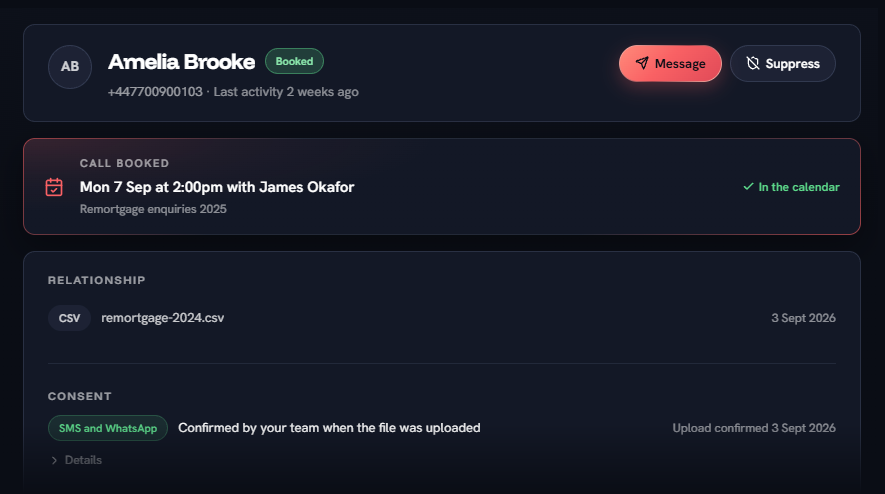
Amelia BrookeBooked
+447700900103 · Last activity 2 weeks ago
Call booked
Mon 7 Sep at 2:00pm with James Okafor
In the calendar
Consent
From remortgage-2024.csv, 3 Sept 2026
Personas
A persona set up like a new starter
It's an AI character that follows up with your leads. You decide who it is, what it knows and where it stops.
- A name, a role and a tone of voice. It tells leads it is an AI assistant, and the photo shows only to your team.
- It deals in plain facts, and nothing else. Business facts are shared by every persona.
- Your own rules, on top of built-in protections that are always on.
- Manually set topics it must hand to a person, and the opening text it sends.
What Ellie knows
Facts it can use in answers. Asked about anything else, it is told not to guess.
Facts for Ellie
- We cover remortgages, product transfers, moving home, first homes and buy-to-let
- A first call is free, takes about 20 minutes and needs nothing prepared
- We look at the whole market, including deals from the current lender
- It is worth reviewing a deal about six months before it ends
Preview
First message
Hi James, it's Ellie, an AI assistant for Halden & Pike Mortgages. You spoke to us about your mortgage last year. Is it still worth a quick catch-up with one of the team?
Campaigns and the pilot
Try it on a small group, then roll out
A campaign is a group of contacts, a persona and one goal, set up in four steps.
- It starts as a pilot of 50 contacts, or however many you choose.
- Texts go out a few a minute, and only inside your send window.
- Nothing more is sent until you roll out, and you can pause at any time.
- A lead who doesn't reply gets nothing more. There are no chasers.
Pilot complete
10 of 10 contacted · 7 replied · 2 booked
Read the conversations, then roll out to the remaining 6 when you're happy.
Funnel
4 in conversation · 1 opted outConversations and Needs you
The persona answers. You step in when it counts.
The persona answers in your voice and offers two real free times. Some threads need someone from your team to reply.
- Handover topics, a reply that fails its check, or 12 AI replies send a thread to Needs you.
- Typing a reply takes the thread over, and the persona stays quiet.
- Hand it back when you are done, and the persona carries on.
Gemma Woodhouse
Replying now: James Okafor
- I was turned down last time and nobody told me why. I'd rather talk to a person.
- Needs you. Grace stepped back and is waiting for a person.
- Your team · James
- Hi Gemma, it's James. I've read your file and I'm happy to go through it on a call.
- Handed back to Grace
Your team and bookings
Your team sees its own calls and conversations
Team members see My day, Inbox and Bookings: only their own conversations and calls.
- Each connects their own Google Calendar, or a campaign books into one shared diary.
- Leads are only offered times inside the booking hours you set.
- Without a calendar, a booking is recorded and someone confirms it by hand.
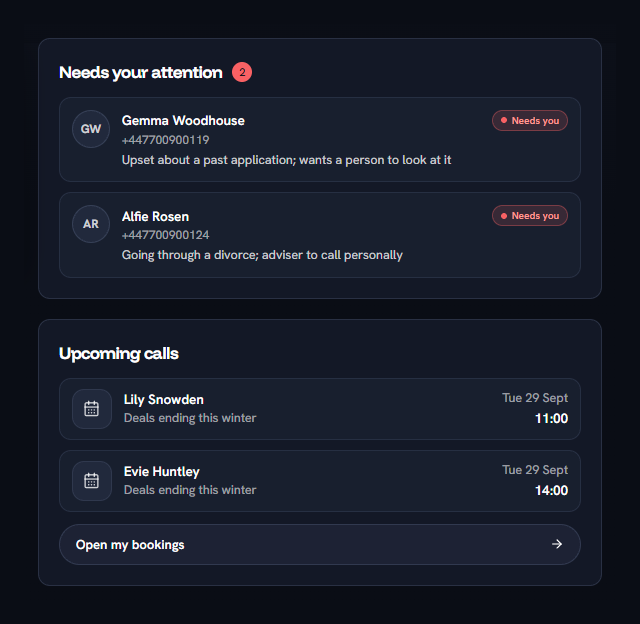
Upcoming calls
Lily Snowden
Deals ending this winter
Tue 29 Sept
11:00
Evie Huntley
Deals ending this winter
Tue 29 Sept
14:00
Your team
Invite your team and set when they take calls
Owners invite team members from Settings and set when each one takes calls.
- Deactivating someone blocks their sign-in. Their conversation history stays.
- Owners keep the contact list, the do-not-contact list and the settings to themselves.
Your team
Team members take the calls your campaigns book, inside the hours set for each one.
RachelOwner
rachel@haldenpike.co.uk
Google Calendar connected
Sarah MitchellActive
sarah@haldenpike.co.uk
Mon to Fri, 9:00 to 17:30 Google Calendar connected
James OkaforActive
james@haldenpike.co.uk
Mon to Thu, 10:00 to 18:00 Google Calendar connected
SamActive
sam@haldenpike.co.uk
Tue and Thu, 9:30 to 14:00 Books the company diary
Invite someone
Safeguards
Your rules, and protections that are always on
You write the rules for what your personas may say, and every AI reply is checked against them. Industry rules for regulated businesses, such as FCA mode, can go on top to lower the risk further.
What Ellie won't do
Every reply is checked against these before it is sent.
A reply that breaks a rule isn't sent. The lead gets a short holding line and the thread comes to you in Needs you.
Built-in protections
- Says it is an AI assistantAlways on
- Respects STOP and opt-outsAlways on
- Told to use only the facts you give itAlways on
- Built to ignore messages that try to change its instructionsAlways on
Your rules
- Never quote a rate or a monthly payment
- Don't talk about other lenders' products
- No promises about approval
- Always on
Checked before it sends
Every AI reply, against your rules and a second AI review.
- Always on
Says it is an AI
The first message says so, and the persona says it again whenever a lead asks.
- Always on
STOP and opt-outs respected
STOP puts a lead on your do-not-contact list, checked before each message.
- Always on
Your sending hours and spend cap
New messages are held outside your hours and once your cap is reached.
These safeguards reduce risk. They don't guarantee compliance, and they don't replace your business's own legal and regulatory responsibilities, including having permission to contact each lead.
Results
Calls booked, and what each one costs
Results displays all calls booked and the cost of each one.
- Every campaign side by side, from contacted to cost per booked call.
- An estimated pipeline from your own value per call, marked as potential, not revenue.
- This month's spend on AI, SMS and WhatsApp, against your cap.


AI assistants
Ask your AI assistant about your leads
Connect an assistant such as Claude and ask about campaigns, replies and calls. It answers from your own account, as your role allows.
How the MCP connection worksYour AI assistant
Connected to XchoYou: What's waiting for me in Needs you?
Used Xcho list-needs-you
Two conversations are waiting for a person:
Both were handed over by Grace. Reply in Xcho to take either one over.
- Website formConnectedNew enquiries go into a live campaign
- HubSpotConnectedContacts come in, and opt-outs stay in step
- SMSConnectedThe opening text, from a UK number we set up
- WhatsAppConnectedWhere a lead can choose to carry on the conversation
- Google CalendarConnectedReal free times, and the call lands in the diary
Amelia Brooke
Remortgage enquiries 2025
Second one please, I finish work at 2
Done. You're booked in with James for Tue 8 Sep at 2:30pm.
In the calendar
Connections
Plugged into the tools you already use
Xcho sits between where your leads are and where your calls go. You connect each one in Settings, through the provider's own sign-in.
Leads in from wherever they are
A spreadsheet, HubSpot, or your website form straight into a live campaign.
Conversations on SMS and WhatsApp
We set up a UK phone number for the opening text. Leads who reply can choose to carry on in WhatsApp, or keep texting.
Calls in the diary
Real free slots from Google Calendar, and the booked call lands there too.
Early access
See what your old leads are worth
We're opening Xcho in stages. Join the waitlist and we'll be in touch when there's a place for your business.